Cloud backup and restore for your SAP Logon systems
Updated February 2026
Losing your SAP Logon system list to a wiped or replaced machine is annoying — and avoidable. SAP Logon Transfer can push a timestamped copy of your configuration into a cloud folder you already sync, so a fresh machine is one click away from having all your systems back.
How it works
There are no accounts to create and no API keys. The feature simply reads and writes inside a folder you choose — typically your OneDrive, Google Drive or Dropbox folder. Your normal cloud client syncs that folder to the cloud as usual, so your backup rides along with the sync you already trust.
Backing up
1. Open Cloud backup & restore
From the main window, open Cloud backup & restore.
2. Choose your cloud folder
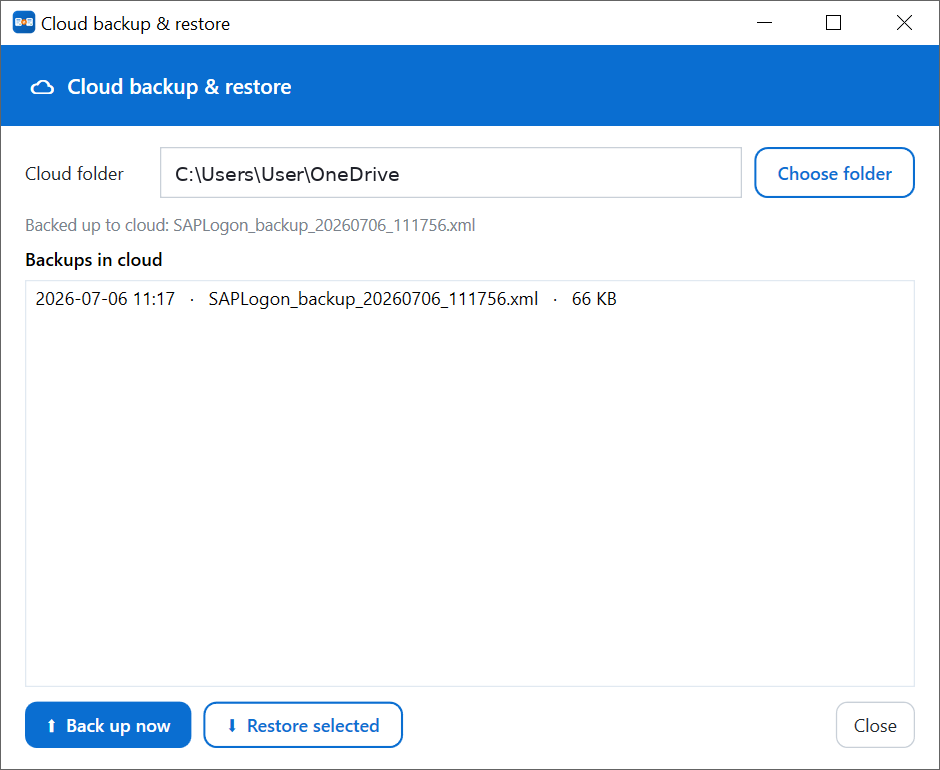
Click Choose folder and point it at your OneDrive, Google Drive or Dropbox folder. The tool remembers it for next time.
3. Back up now
Click Back up now. A timestamped file (for example
SAPLogon_backup_20260706_111756.xml) is written to the folder and
appears in the list. Your cloud client syncs it automatically.
Restoring on another machine
On a new or reinstalled machine, install SAP Logon Transfer, open Cloud backup & restore, and choose the same cloud folder. Your previous backups appear in the list with their date and time. Select the one you want and click Restore selected.
Restore imports your systems safely — it doesn't blindly overwrite. Existing systems are kept, only what's missing is added, and a backup of the current state is written first.
Why timestamps matter
Each backup keeps its own date and time, so you're not limited to a single "latest" copy. If you reorganised your folders last week and want to go back to how things were, pick the earlier backup from the list. It's a simple version history for your system list.
No passwords involved
As everywhere in the tool, only connection details are backed up — servers, routers and system IDs. SAP Logon never stores passwords in these files, so your cloud backup is safe to keep.
Related guides
Free, portable, Windows 10/11.